Shopping & Deals Guides
Child Safe Portable Power Banks: A Parent’s Compliance Guide
2nd Sep•10 min read
The Anker 737 is the strongest fit here for laptop-capable, multi-device charging and live charging information—not for a verified percentage readout or proven runtime. Its 24,000mAh rating, three ports, and shared 140W ceiling are useful, but delivered energy remains independently untested.
Important: No independent test verifies delivered watt-hours, efficiency, device charge counts, or display accuracy, so the 24,000mAh label cannot support a precise runtime promise.
A power bank with percentage display can make runtime planning feel less like guesswork, but only if you separate readout convenience from battery level accuracy. A screen can show useful live information, yet it cannot, by itself, prove how much energy will reach your phone or laptop; our power bank display accuracy comparison explains why display type and calibration matter. This guide reviews the Anker 737 Power Bank (PowerCore 24K) on the data available and lays out the buying checks that matter before you pay for an LCD battery display.
The short version: buy the display for visibility into what the bank is doing, not as a substitute for verified delivered energy. Value is delivered watt-hours, not coupon codes or buzzwords.
The Anker 737 Power Bank (model A1289) is a three-port model with two USB-C ports, one USB-A port, a manufacturer-stated 24,000mAh capacity, and a 140W total-output ceiling. Its Smart Digital Display is described as showing real-time input power, output power, and an estimated recharge time.
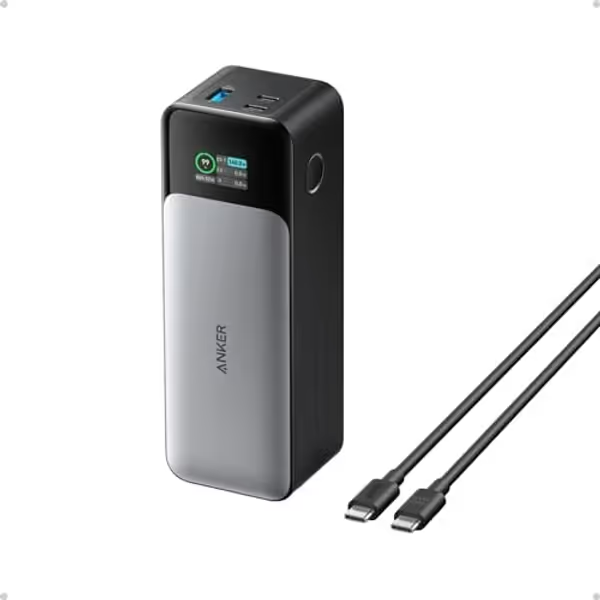
That makes it a more useful candidate than a bank that only offers a few status LEDs (if those live readings solve your actual problem). For example, seeing whether the bank is taking input power during a short hotel stop is genuinely useful. Seeing output power helps identify an obvious charging bottleneck. A recharge-time estimate can help decide whether to leave the bank connected before heading out.
But there is one boundary worth stating clearly: the available product information does not verify that this model shows remaining charge as a percentage. It also does not establish the precision or calibration of any state-of-charge figure. Do not purchase it on the assumption that its display has a verified percentage readout or that a numeric display must be more accurate than LEDs.
That distinction protects you from a common bad purchase: a sleek screen that creates confidence without improving the energy outcome. I have watched a premium bank collapse to 12W shortly after starting while a cheaper one held 20W; the charge logs were more persuasive than the cosmetics. The same skepticism applies here. A readout is useful when it helps you observe input, output, and timing, not when it encourages you to ignore power stability, device negotiation, and capacity.
For laptop-capable portable power, the headline electrical figure is the shared power budget. The Anker 737 has a 140W maximum total output, not 140W reserved for every connected device. Its USB-C ports include a listed 28V/5A profile, while the USB-A port is specified up to 18W.
That specification gives it a serious ceiling for a single compatible USB-C device, but it is not an automatic 140W result. USB Power Delivery works through negotiation between the bank, cable, and device, so understanding PD versus QC compatibility can help prevent slow or mismatched charging. The device ultimately accepts an available charging option within its own limits. A high-watt bank connected through an unsuitable cable or to a lower-input device will not turn that device into a 140W load.
Use this decision sequence:
When both USB-C ports are used, Anker states that the 140W total is divided according to the two connected devices' input needs. It specifically does not provide 140W to each USB-C port at the same time. No port-allocation table is available here, so do not plan a three-device workflow around assumed per-port wattage splits.

For a creator or field worker, that means the display has practical value as a check-in point: plug in your laptop, then add your phone, and observe the reported output rather than assuming both retain their preferred charging rate. It is a more disciplined approach than trusting labels alone.
Anker states a 24,000mAh capacity. That is the manufacturer's advertised capacity, not independently measured delivered energy at the USB output. There is no independent usable-watt-hour test in the available evidence for this model, no controlled thermal test, and no device-specific charge-count test that can support a precise runtime chart.
A retailer listing says the bank may offer an estimated 6,600 to 7,800mAh to devices, attributing the reduction to energy loss in cells and conversion circuitry. However, the listing does not provide a defined test method or voltage basis. That makes it unsuitable for calculating price per delivered Wh or comparing it directly with properly measured competitors.
This is where deal analysis often fails. mAh figures are easy to print and hard to compare across voltage and load conditions. A defensible price per delivered Wh requires a measured output-energy result under stated conditions; see our guide to calculating real device charges from power bank capacity for the practical math behind runtime estimates. Without it, there is no honest stability-adjusted value index to publish for the Anker 737.
So, how should you plan?
The display can tell you what is happening now; only a measured charge cycle tells you what your workflow consumes.
Broadly, 10,000mAh and 20,000mAh-class banks serve different carrying strategies. A 10,000mAh bank can provide many current flagship phones roughly two full charges, while a 20,000mAh bank is positioned for substantially more reserve, such as multiple phones or a phone-plus-tablet routine. Higher capacity commonly brings more weight, bulk, and price. There is no universal winner: choose 10,000mAh for low-bulk phone coverage, and step up when multiple devices or longer time away from mains power makes the extra reserve worth carrying.
The 737's stated dimensions are 6.13 × 2.15 × 1.95 inches. Weight information varies across listings: Anker's own pages list 630g and 632g, while a retailer comparison table lists 595g. Treat it as a sizeable, high-capacity unit and confirm the current seller specification if grams matter to your pack list.
The documented display functions (input power, output power, and estimated recharge time) are most useful at three moments.
Connect the bank to the charger you intend to travel with. The Anker 737 accepts up to 140W PD input through USB-C1. Anker says a 140W PD wall charger can recharge it in about one hour, while a 96W MacBook Pro PD charger takes around 1.5 to 2 hours. Those are manufacturer statements and depend on the charger and charging setup.
The buyer lesson is simple: fast bank recharge requires a suitable PD charger as well as the bank itself. If your travel charger cannot supply comparable input capability, plan for a longer refill window.
Check the live output reading after connecting the device. Then check again after adding a second USB-C device. You are looking for evidence that the real arrangement still fits your needs, especially because USB-C devices share the 140W total budget.
Do not leave the settings selection screen always on just for the comfort of constant telemetry. Anker says that mode uses 0.36W and can consume about 15% of the power bank's battery over roughly 24 hours. Turning the display off when it is not needed is an easy runtime-preservation step.
That is a small but important piece of battery level accuracy in practice: a correct reading is less useful if the act of continuously displaying it becomes a meaningful source of drain.
A smart display can surface data that might surprise a first-time buyer. On receipt, Anker notes that Screen Usage, Total Input, and Total Output may already be nonzero because of factory production and testing. That alone is not evidence that the unit has been used by another customer.
Anker separately says Battery Cycle should be 0 and Battery Health should be 100% on receipt. Check those fields if available, then run a normal charge and discharge cycle with a device you know well. The goal is not to invent a laboratory result; it is to establish a personal baseline:
Also inspect the enclosure and ports before relying on any lithium-ion product. For broader guidance on inspecting, storing, and using these devices safely, consult our power bank safety usage guide. A 2026 recall involving an unrelated solar power-bank model reported that its lithium-ion battery could swell and overheat, posing a burn hazard. That recall is not evidence of a problem with this Anker model; it is a reminder to take physical damage, abnormal heat, or swelling seriously rather than rationalizing it away.
At the time of Anker's support article, Anker listed a 24-month warranty for the 737; terms can vary by market and change over time. That is a meaningful part of warranty term scoring because a power bank is a consumable energy product with electronics, ports, and a display, not merely a capacity figure on a listing.
There is also a practical box-content conflict. A retailer listing says a 140W USB-C-to-USB-C cable is included, while Anker's support material describes a 2-foot USB-A-to-USB-C cable. If you need a cable capable of a particular USB-C charging workflow, confirm the current package contents with the seller rather than budgeting from an old listing.
Its case rests on a combination of high shared output, a 24,000mAh capacity class, three ports, fast-input potential, and readable operating information. Without independently measured delivered Wh, I would not call it a proven bargain on energy value alone. Value index updated: the price can be justified for buyers who will actually use the high-power USB-C capability and live telemetry; it is harder to justify for someone charging one phone overnight.
The Anker 737 Power Bank is a credible choice for travelers and mobile workers who need more than casual phone backup: a laptop-capable USB-C ceiling, two USB-C ports plus USB-A, and a Smart Digital Display that is documented to show input, output, and estimated recharge time. It is particularly sensible when fast replenishment matters and you already own (or are prepared to buy) a suitable PD charger and cable.
Do not buy it because you assume the screen provides a verified remaining-battery percentage or superior battery level accuracy. That evidence is not established. Do not budget its runtime from the 24,000mAh rating alone, either; no independent delivered-energy test is available here.
The fair verdict is measured rather than promotional: choose it for observable charging behavior and a high-output, multi-device design. Pass if you only need compact phone backup, need a proven percentage display, or require independently tested delivered watt-hours before you can judge price per delivered Wh. Proven watts, compatible cables, and a warranty you can use matter more than a bright screen.
The available product information documents a Smart Digital Display with real-time input power, output power, and estimated recharge time. It does not explicitly verify a remaining-charge percentage readout or explain how to access one. Check the current manual or seller listing for the exact unit before buying if percentage visibility is essential.
Neither is universally better. A 10,000mAh model favors portability and can suit phone-focused days. A 20,000mAh-class model offers more reserve for multiple devices or longer time away from outlets, at the usual cost of more bulk, weight, and price. Choose based on your device load and the penalty you are willing to carry.
No. Its 140W rating is a total output ceiling. When both USB-C ports are in use, Anker says the total is divided between devices according to their input needs; it does not supply 140W to each port simultaneously.