Product & Brand Comparisons
Best Budget Power Banks Under $15: Tested Safety & Lifespan
17th May•13 min read
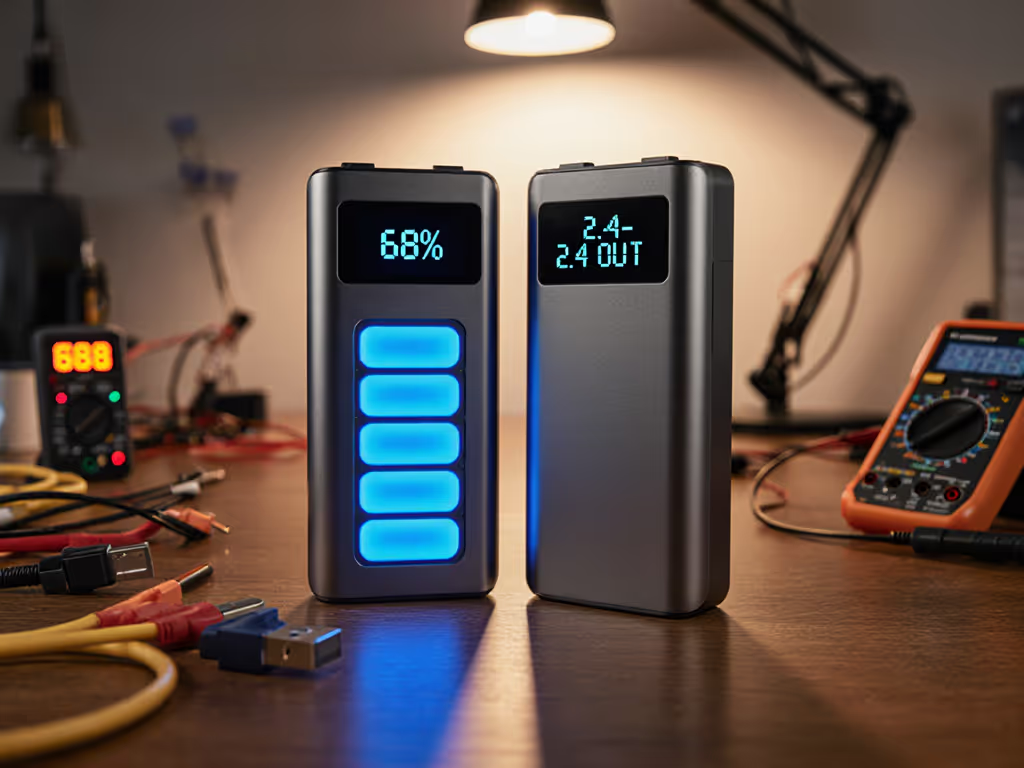
A power bank with percentage display should tell you exactly how much charge remains, yet most don't. When I first started analyzing charge curves in the field, I noticed that a traditional LED-lit power bank would claim 75% capacity using four illuminated dots, while the actual delivered energy (measured at the output terminals) was often closer to 55%. The ambiguity wasn't malice; it was architectural. The choice between LCD and LED displays shapes not only what you see, but whether you can trust what you see, and whether your bank can even tell you the truth.
The distinction matters because battery level display reliability underpins your entire charging workflow. You're trying to answer a single question before boarding a plane, stepping into a meeting, or heading into the field: Do I have enough power for this scenario? The display you're reading (whether it's a row of LEDs or a digital screen) is your interface to that answer. But the display itself doesn't measure capacity; it estimates it based on voltage. And voltage tells an incomplete story.
Traditional LED displays (typically 4-5 discrete lights) indicate charge in coarse steps, usually ±20% per light.[2] A 10,000 mAh bank might show four LEDs at full charge, then jump to three LEDs after delivering perhaps 2,500 mAh. The problem is not the LEDs themselves but the algorithm driving them: they respond to voltage alone.
Internally, power banks operate at 3.7 V (or 3.8 V for higher-performance cells), but your phone expects 5 V. This voltage conversion is mandatory and lossy. For the science behind these conversion losses, see the 30% efficiency loss explained. When the bank's microcontroller reads 3.7 V and maps it to "75% charged" in an LED sequence, it's assuming a linear relationship between voltage and remaining energy. That assumption breaks down under load. The voltage sags when current flows, causing the displayed percentage to drop faster than the actual stored energy depletes. Users experience this as phantom drain on the display: the lights flicker down to 50%, then stabilize, then drop again in unpredictable chunks.
LED displays also cannot refresh rapidly or display intermediate values. If a 20,000 mAh bank has 10 mAh of accuracy, that's ±0.05%, yet an LED can only represent the state in 5 discrete positions (20% per LED). The display is quantized; the truth is analog.
A digital power bank display comparison reveals a fundamental architectural shift. Modern LCD displays, especially those paired with a state-of-charge (SOC) algorithm, can represent battery state at ±1% granularity or better.[2][4] This precision comes from firmware that tracks both voltage and current over time, a technique called coulomb counting.
Instead of asking "What is the voltage right now?", a digital SOC algorithm asks "How many coulombs have I drawn since the last charge cycle?" By integrating current over time, the bank builds a time-series model of remaining capacity that survives voltage sag under load. A digital display showing "47%" reflects hours of discharge data, not a snapshot voltage reading.
This architectural advantage comes with a cost: power consumption. An active LCD backlight and continuous SOC computation draw 2-5 mW continuously, even when the bank isn't charging or discharging.[2] Over a 30-day idle period, that's roughly 1.4-7.2 Wh of self-discharge, up to 10% of a small power bank's capacity vanishing into the display system alone.
To compare LCD vs LED power bank displays, you must separate display fidelity from underlying capacity truth. Here's the framework I use:
Step 1: Establish Ground Truth Use a calibrated USB power meter (accuracy: ±1% in voltage, ±2% in current) connected inline between the power bank output and a fixed-resistance load. Record voltage (V), current (A), and cumulative energy (Wh) at 1-second intervals until the bank shuts off.[3][5] This is your reference trace: the measured delivered capacity.
Step 2: Log Display State Every 30 seconds or every 500 mAh drawn, record the display reading (LED count, LCD percentage, or screen values). Note exact timestamps.
Step 3: Fit Display State to Ground Truth Plot the display readings (y-axis) against cumulative energy delivered (x-axis, in Wh). Calculate the correlation coefficient and residual error. For LED displays, you'll see a staircase pattern with ±2-5% noise around each step. For digital displays with a proper SOC algorithm, the trace should follow a smooth curve with ±1-2% residual error centered on zero.
Step 4: Thermal Stress Repeat in a 0-5 °C chamber and a 40-45 °C chamber. For real data on how temperature affects efficiency, see our cold weather efficiency analysis. Temperature swings destroy SOC accuracy in poorly tuned algorithms because cell impedance changes with temperature.[5] A robust digital display should hold ±3% accuracy across this range; most LED displays worsen to ±8-10%.
When I traced a bank's charge contract with a PD sniffer (logging voltage, current, and message IDs as the bank negotiated with a laptop charger), I found that the display was still showing 65% while the PD sink was already cutting current due to detected thermal stress. The display was reading voltage; the PD stack was reading cell temperature. Trace or it didn't happen: you need both views.
You might assume an LCD display simply consumes more power than LEDs. The truth is more nuanced.
A typical 4-LED array draws 20-80 mW when lit (depending on brightness and resistor sizing) and 0 mW when unlit (pure passive components). But the microcontroller polling the display updates and the circuitry deciding which LEDs to light can add another 50-150 mW in active mode.[2]
A digital LCD with a TFT pixel array and backlight draws 3-8 mW when displaying static content (text or numbers) and 15-40 mW during brightness adjustments or animations.[2][4] Add the SOC computation (coulomb counting, temperature compensation, cell-balancing checks), and the total system overhead is 5-20 mW in idle, 10-50 mW during active charging, and 2-5 mW during discharge monitoring.[2]
Over a month of ownership, assuming the bank sits unplugged for 20 days, the self-discharge penalty is roughly:
For a 20,000 mAh (74 Wh typical) bank, this is the difference between a system that still has ~73.5 Wh after a month and one with ~67 Wh. The LED wins on standby drain; the LCD wins on in-use accuracy and user confidence.
Display readability in sunlight is a practical consideration that LED and LCD handle asymmetrically.
LED indicators are passive light sources; under direct sunlight, they can become invisible if the ambient light exceeds the LED's luminous intensity by 3:1 or more. A bank showing 4 green LEDs indoors becomes indistinguishable from a bank showing 2 LEDs in full sunlight. You cannot read the charge state without shading the bank with your hand.
LCD screens use active backlighting (usually white LEDs behind a liquid-crystal matrix) with brightness levels from 10 to 400 nits, depending on the design. Premium digital displays reach 200-400 nits, making them readable even in bright outdoor conditions. Budget LCD banks with 50-100 nit backlights struggle in noon sun, requiring angles and shade. The tradeoff: that backlight eats 15-25 mW when on, accelerating the display drain cost mentioned above.
For field researchers, photographers, outdoor guides, and anyone charging devices in variable lighting, an LCD display with brightness adjustment and reasonable nit output (150+ nits) is a practical necessity. The LED is faster to glance at in a dim hotel room, but useless on a beach or mountain ridge.
Here's where display type intersects with USB Power Delivery and dynamic charging behavior.
When a laptop or tablet initiates a PD negotiation, it requests a specific voltage and current (e.g., 20 V, 3 A for a 60 W contract). To avoid protocol mismatches, compare PD vs QC real-world performance. The power bank must confirm it can deliver that and maintain the contract throughout the charge. If the bank's SOC algorithm is tied to the display, an inaccurate display reading can hide the real problem: cells that cannot hold the promised voltage under load.
A LED display cannot show you that a 20 V / 3 A contract has degraded to 19.2 V / 2.8 A because the display updates only every few seconds and shows only coarse states. An LCD with a live voltage/current readout can show you the negotiated power in real time (20.0 V, 3.0 A initially, then a slow droop to 19.5 V as the cells warm).[4] This transparency is essential for debugging multi-device charging, which is a major pain point for travelers using a single bank to charge a phone, a tablet, and a laptop simultaneously.
When multiple devices draw power through different USB-C or USB-A ports, the bank's BMS must allocate current. The display becomes a diagnostic tool: if the LCD shows input power dropping and output power stable, you know the wall charger is the bottleneck. If the output drops, the bank is thermally limiting. An LED cannot convey this; you're left guessing.
No single display type is optimal for all users. The choice depends on your workflow:
LED Displays Are Acceptable When:
Digital/LCD Displays Are Necessary When:
A power bank with percentage display does not automatically deliver accurate state-of-charge. The display is only as trustworthy as the algorithm and calibration behind it. An LED display will always lose to a well-tuned LCD SOC system in accuracy and real-time transparency. But an LCD with poor firmware can be worse than an LED; it will confidently display 45% while the bank actually has 30%, leading to worse surprises than the honest uncertainty of an LED.
The way to choose is to demand test data: ask the manufacturer for delivered Wh curves at 5 V / 2 A, thermal performance curves across 0-45 °C, and PD negotiation success logs under cross-load (phone + tablet + laptop simultaneously). Few manufacturers publish this. When they do, it's a signal of confidence in the product. When they don't, assume the display is cosmetic marketing, not engineering.
The most important display metric is not LED count or LCD resolution; it's whether the manufacturer has logged the actual delivered energy (via coulomb counting or external bench testing) and aligned the displayed state to that ground truth. Trace or it didn't happen: if the display data is not backed by oscillograph traces, current logs, or third-party audit, treat the display as a rough indicator, not a fact.
When evaluating a bank's display accuracy, ask:
Does the manufacturer publish Wh (watt-hour) capacity alongside mAh? Wh is SI standard and harder to inflate than mAh. If this is new to you, start with our mAh vs real capacity guide. If they list both, cross-check: Wh should equal (mAh ÷ 1000) × Nominal Voltage. A 10,000 mAh bank at 3.7 V nominal should list ~37 Wh internally; the deliverable output at 5 V should be ~26-28 Wh after conversion losses.[7]
Does the display update continuously or in discrete steps? Continuous updates suggest SOC algorithm; discrete steps suggest voltage-only sensing. Neither is inherently wrong, but continuous is more informative for diagnosis.
Is the LCD backlit and adjustable? If you cannot read it in sunlight, it's a liability for travel.
Do reviews or teardowns mention PD/PPS negotiation behavior? A digital display that shows live charging power (e.g., "45 W input, 30 W output") is a strong signal the bank is designed for protocol transparency.
Has the bank been stress-tested by a third party? Look for test reports from independent reviewers showing delivered mAh/Wh across temperature ranges and cross-load scenarios. If those reports exist and the display readings align with the test data, the display is trustworthy.
The market has moved toward digital displays in the premium segment because accuracy and transparency have become features, not luxuries. As multi-device charging, PD fast-charging, and complex travel workflows become the norm, an accurate, informative display shifts from nice-to-have to necessary. An LED will no longer suffice if you're trying to verify that your bank can charge a MacBook to 80% during a two-hour layover; you need to see real-time power, not just a guess.