Shopping & Deals Guides
Best Power Banks for Content Creators in 2026: Camera, Laptop & Phone Picks
6th May•12 min read
The Cuzor Mini UPS Pro for 12V up to 3 Amp is the clearest conditional choice, but there is not enough independent, comparable evidence for a credible multi-product ranking. Buy by electrical compatibility and conservative watt-hour calculations—not headline runtime.
Searching for the best mini UPS for WiFi router can produce a long list of capacity claims and very little decision-grade information. This WiFi router UPS buying guide takes the opposite route: start with the voltage and current printed for your equipment, size backup using watt-hours, and reject runtime promises that do not survive the arithmetic. Value is delivered in watt-hours, not coupon codes or buzzwords. If you are deciding between a dedicated mini UPS and a repurposed USB power bank, our mini UPS versus power bank comparison explains the differences in voltage, failover behavior, and backup duration.
A caution before the list: there is not enough comparable, independently tested evidence to publish a credible multi-product ranking here. One model has a clear manufacturer identity and usable specifications: the Cuzor Mini UPS Pro for 12V up to 3 Amp. Treat its stated runtime as a manufacturer claim, not a verified result. That is more useful than calling several poorly documented listings "the best."
The first purchase filter is simple: match the UPS output voltage to the router’s required voltage. Check the power information on the router, modem, or their adapter before ordering.
The risk is not theoretical, which is why this power bank safety guide recommends treating voltage, connector, and storage requirements as essential checks. Mini-UPS manufacturer guidance warns that supplying 12V to a device requiring 9V can cause damage, while supplying 9V to a device requiring 12V can lead to brownouts or rebooting. Capacity, price, and a large marketplace star rating do not repair a voltage mismatch.
Write down these four details before comparing any home WiFi backup UPS:
The final point deserves attention because the correct purchase scope depends on every item you intend to keep powered. Do not assume that a UPS sized for one device necessarily covers another.
Skip spec-sheet traps: a bigger capacity number does not make an incompatible voltage safe.
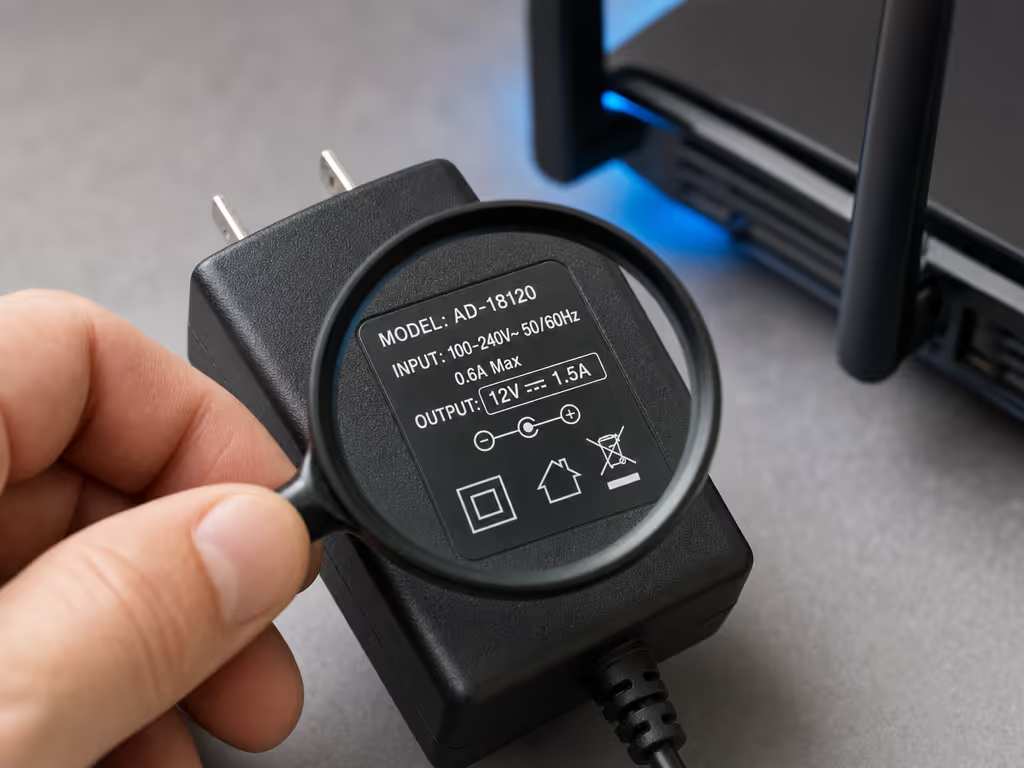
Once voltage matches, compare current. The UPS output-current capacity should be equal to or greater than the router’s demand. This is the second hard gate in a router power bank recommendation.
The basic electrical relationship is:
Voltage × current = wattage
For sizing, it helps to translate the figures on the equipment label into a power ceiling. A 12V, 1A requirement corresponds to 12W; 12V, 2A corresponds to 24W. This calculation does not establish actual operating consumption or actual runtime. It simply gives a clear way to understand the power figures being compared.
A listing that offers the correct voltage but less current than the equipment requires fails the match requirement. Do not rationalize that away with a claimed backup-hour figure. The current-capacity guidance is clear: the UPS should meet or exceed demand.
Also confirm the physical connection. The Cuzor model discussed below uses a 5.5 × 2.1mm DC jack for its input and output. That detail is useful only if it matches the connection required by your equipment; it is not a universal router standard.
Backup claims are where deal pages often become least reliable. Use watt-hours (Wh) as the capacity figure for your first-pass estimate, then be conservative.
The sizing framework is: For a practical method of converting capacity ratings into expected device charges and runtime, see our real-world power bank capacity guide.
Theoretical runtime (hours) = UPS capacity (Wh) ÷ average load (W)
The same manufacturer guidance recommends applying a 0.85 derating factor to allow for conversion losses and battery aging:
Conservative estimate (hours) = (UPS Wh × 0.85) ÷ average load (W)
This is an estimate, not a replacement for a runtime test with your own connected load. It is nevertheless a much stronger buying method than accepting an unqualified "up to" number.
Suppose your measured or otherwise established average load is 10W and you are considering a 32.19Wh UPS:
That does not predict a specific product’s result. It shows how to establish a conservative target before you buy. If your target is four hours, a calculated 2.74-hour estimate is not a four-hour solution merely because a listing uses favorable wording.
This is the basis of a useful stability adjusted value index: compare price against the conservative Wh-based runtime target that fits your load, and give more weight to claims you can verify. A low price with an impossible runtime claim is not value.
The Cuzor Mini UPS Pro for 12V up to 3 Amp is the one model in this comparison with a clearly identified manufacturer page and a defined specification set. It is a candidate only for an equipment setup that passes its stated limits and connection checks.
Cuzor identifies the model as the "Cuzor Mini UPS Pro for 12V up to 3 Amp." Its manufacturer-stated specifications include:
The manufacturer also states that Air Fiber devices are not supported. That limitation belongs in the buying decision, not in fine print.
Do not read "12V" in a model title as proof of a fixed regulated 12V output. Cuzor’s own specification table says output is 0.4V below input on mains and battery. If your equipment requires an exact input condition, confirm compatibility rather than inferring it from the product name.
Cuzor’s specified setup is:
The supplied bridge cable is stated to be 30cm long with 2.5mm male connectors at both ends. Confirm that this arrangement and the connector dimensions work for your equipment before purchase.
Cuzor states 4 to 8 hours, depending on load. Because recharge time also affects how quickly the unit is ready for the next outage, our guide to optimizing power bank recharge speed covers input wattage, chargers, and cable choices. No independent controlled runtime test is available here, so that figure should remain a claim, not a planning guarantee. The 32.19Wh capacity permits you to run the sizing formula with your own established load and decide whether the result meets your minimum outage window.
I have seen sleek battery hardware command a premium and then settle at a disappointing output after a few minutes, while a cheaper alternative held its expected level. The lesson transfers neatly here: the stated capacity is a starting point; the delivered result is the verdict.
A capacity number and a runtime number must be compatible. If they are not, do not treat the runtime claim as a buying reason.
One retailer listing for a BFKK mini UPS states 38.48Wh / 10,400mAh, with USB 5V/2A, one DC 9V/2A, and two DC 12V/2A outputs. The same listing claims about 12 hours for a 10W router.
Using the stated capacity alone:
That does not support treating "about 12 hours" as credible without further verification. The listing also identifies the brand as BFKK, so its specifications should not be transferred to similarly named generic products elsewhere.
This is exactly why a best WiFi UPS India or global "best buy" list should not be built from title text alone. Current pricing, stock, warranty terms, regional availability, and Indian BIS compliance are not established here for the products under discussion. A real price per delivered Wh comparison requires an observed price and a repeatable delivered-runtime result. Without those, depreciation curves and warranty term scoring would be invented precision.

For a router mini UPS 2026 purchase, this checklist is more dependable than a ranking badge.
The last check matters more than it sounds. A listing cannot become trustworthy by borrowing output ports, capacity, or runtime language from a different brand or incompletely identified model.
Choose a unit whose output voltage matches your router requirement and whose current capacity is at least the required current. Then estimate backup time with:
Capacity in Wh ÷ average load in W
For a more conservative target, multiply capacity by 0.85 before dividing by the average load. Use the result as a sizing estimate rather than a guarantee.
If you want backup power for a router during an outage, the decision is mainly about your desired backup duration and whether you can identify a voltage-, current-, connector-, and polarity-compatible unit. Also check whether both the router and ONT require backup for your intended setup.
Buy in this order:
The best mini UPS for WiFi router is not the one with the loudest backup-time claim. It is the unit that matches your equipment’s voltage, meets its current requirement, fits the connector and polarity, and has enough watt-hours to meet a conservatively calculated runtime target.
For the evidence available, the Cuzor Mini UPS Pro for 12V up to 3 Amp is the clearest conditional recommendation: consider it only if your equipment is compatible with its stated 12V/up-to-3A limits, its 5.5 × 2.1mm connection, and its manufacturer-described output behavior. Its claimed 4 to 8 hour backup range should be treated as load-dependent manufacturer guidance, not a universal promise.
Do not buy on a capacity headline, a generic title, or a runtime claim that cannot survive Wh to W arithmetic. Calculate first, verify the physical and electrical match second, then compare price. That is how a home WiFi backup UPS becomes a practical purchase rather than a spec-sheet trap.